The problem: fees arrive more often than payouts
An evaluation fee, a reset after a bad day, an activation fee when the account passes, and a monthly data fee each look small on their own. Spread over five, ten or twenty accounts, and over several firms with different rules, they become a second ledger that most traders never total. A payout notification feels like profit. Whether it was depends on everything you spent to get that account to the payout.
The trading side has the same problem. Each account has its own drawdown, its own consistency rule and its own minimum days, and the firm dashboard only shows one account at a time.
How Tiedbook handles the trading side
- Unlimited accounts on one plan, so every evaluation and funded account sits in the same book at $29 a month or $249 a year.
- Dated fee presets apply the commission schedule that was in force on the trade date, and the preview shows the dollars it added.
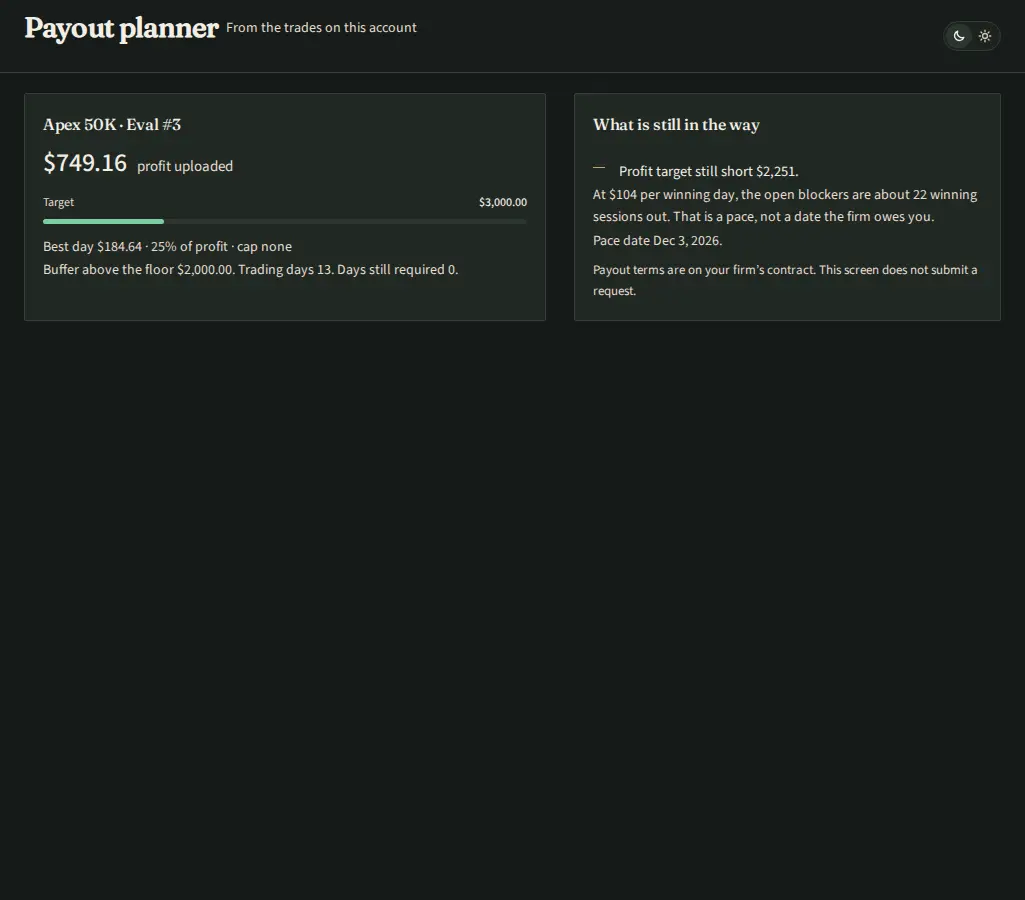
- The payout planner reads the fills on each account against the prop rules preset and lists what still blocks a payout: a profit target that is short, trading days still required, or a best day above the consistency cap. It does not submit a payout request. The firm's dashboard does that.
- Statement match ties each Chicago session to the statement after fees, so the net you track is the net the firm will see.
Tiedbook does not record what you paid the firm for an evaluation, reset or activation, and it does not record payouts you received. Keep those two columns yourself, next to the trading net the journal gives you.
A worked example (illustrative)
These numbers are made up to show the arithmetic. They are not any firm's prices.
A trader runs six accounts over three months. Evaluation fees total $900, two resets cost $200, activation fees on the two accounts that passed total $260, and data fees total $240. Costs are $1,600. The two funded accounts pay out $1,800 and $1,400, so payouts are $3,200.
The ROI formula
ROI = (payouts − costs) / costs. In the example, ($3,200 − $1,600) / $1,600 = 1.0, or 100%. If payouts had been $1,200, ROI would be ($1,200 − $1,600) / $1,600 = −25%. The payout calculator does the split arithmetic for one payout, and the futures fee calculator prices the commissions on a round turn.
CSV export
Trades and fills export to CSV from the journal, with the Chicago session date on every row. Put that file next to your sheet of firm costs and payouts and the whole picture is in one place you control. Notes stay with the trade when you export.